Written By Katie Pottage
First Published: 3rd of August, 2026 | Last Updated: 3rd of August, 2026
Imagery enhancement is a crucial component of forensic imagery examinations, enabling examiners to improve the visibility and interpretability of evidential material through operations such as white balance correction, contrast adjustment and sharpening, thus supporting subsequent forensic comparisons.
The purpose of this article is to assess the performance of forensic and non-forensic software upon executing imagery enhancement operations, assessing both the outputs achieved and the forensic implications.
Methodology
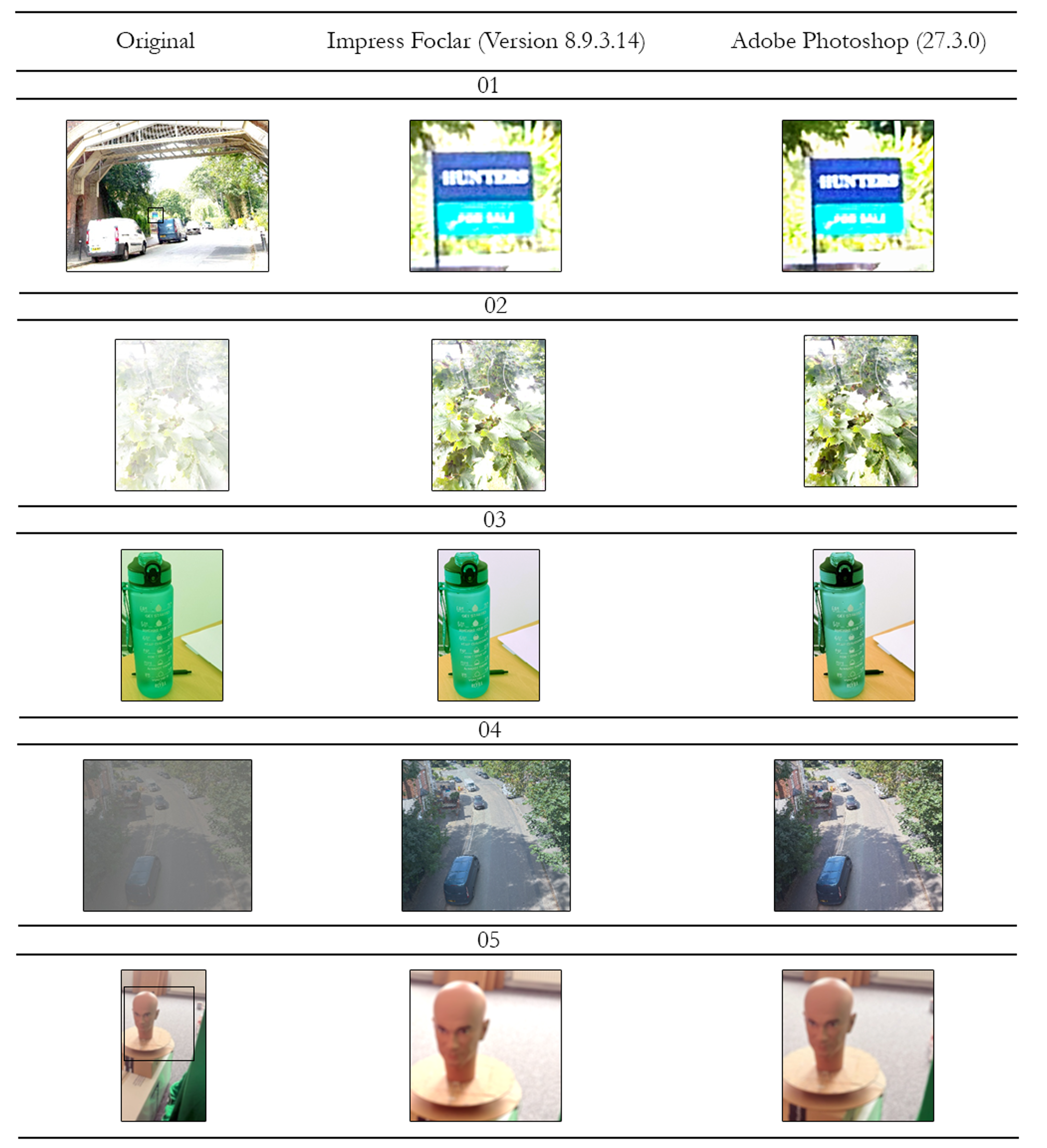
To determine how digital imagery enhancement tools compared, a comparison task was performed between Foclar Impress (Version 8.9.3.14) and Adobe Photoshop (Version 27.3.0). Five photographs with different issues were generated by the forensic unit and enhanced using an internal Standard Operating Procedure (SOP), with focus on a pre-determined region of interest (ROI).
The following imagery enhancement operations were used, in order, where appropriate:
· Crop
· White Balance
· Look Up Tables (Curves)
· Brightness Adjustments
· Contrast Adjustments
· Sharpening
The final images were exported in a PNG format, and the processing logs were retained where possible. The results can be found in the images below.
Sharpening
To facilitate the comparison with Foclar Impress, the 'Unsharp Mask' function was utilised in Adobe Photoshop, as, based on the description and user-definable parameters, it is assumed to employ the same underlying algorithm. The tool provides three user-adjustable controls for amount (%), radius (pixels) and threshold (levels). During evaluation using Adobe Photoshop Version 27.3.0, changes to these parameters were not reflected within the preview window prior to application. Consequently, the effect of the selected settings could not be determined prior to its application during this study.
Following application, the sharpening operation was recorded within the history panel. Further changes to the sharpening parameters required the Unsharp Mask to be reapplied, rather than modification of the previously applied sharpening operation. Conversely, Foclar Impress retains the sharpening operation as an editable adjustment, allowing parameter values to be modified and compared against the original image. In Foclar Impress, the degree of sharpening is quantified in pixels and can be adjusted incrementally as required. In contrast, Adobe Photoshop represents sharpening intensity using the parameters Amount (%), Radius (pixels) and threshold (levels).
The different approaches to the sharpening operation should be considered within a forensic context, where the ability to document and reproduce forensic image enhancement settings is important for transparency, auditability, quality assurance and independent review.
Exposure and Clipping Assessment
The identification of clipped or underexposed areas differed between Adobe Photoshop and Foclar Impress. Both applications provide functionality to identify clipped and underexposed areas; however, the implementation and availability of such during the enhancement process varied.
In Foclar Impress, clipping indicators can be applied to individual enhancement layers, allowing the examiner to assess the effect of specific parameters and any loss of image information. For example, following the application of brightness adjustment, the examiner can identify whether this operation resulted in the clipping of a streetlight.
In Adobe Photoshop, clipping indicators were applied to the image originally imported and were not linked to individual enhancement operations within the workflow. Therefore, when multiple adjustments were applied sequentially, it was not possible to directly determine which operation introduced clipping or underexposure during processing.
Processing Transparency
Foclar Impress is specifically designed for forensic image examination and provides detailed records of the enhancement processes applied. In contrast, Adobe Photoshop provides limited information regarding the underlying algorithms used by many of its enhancement functions. As these processes are proprietary, the specific methods by which image data is processed are not disclosed to the user. Therefore, it may not be possible to independently verify the internal processing parameters applied during enhancement, or determine whether data has been altered, removed or generated. The lack of audibility may present challenges when explaining and justifying image enhancement methodologies within a forensic context, particularly where the reliability, provenance and reproducibility of the resulting image may be scrutinised.
The results obtained during testing suggest that comparable visual outcomes can be achieved using non-forensic software for the five enhancement scenarios evaluated, provided the examiner is appropriately trained and competent in forensic image enhancement techniques. However, visual similarity alone does not demonstrate that identical processing has occurred, or that the underlying image data has been treated in the same manner.
While Adobe Photoshop may produce visually comparable results for the examples examined, this should not be considered equivalent to the ability to document, audit and justify the enhancement process in accordance with forensic best practice.
Processing Logs, Traceability & Repeatability
There were notable discrepancies between the software packages when exporting processing logs. In Foclar Impress, the user can export the processing log in the desired export format. In Adobe Photoshop, the processing log is obtained using the built-in History Log function (Edit> Preferences > General> History), where the user can save log items to metadata, a text file, or both. During evaluation of the processing log exported from Adobe Photoshop, it was found that the history log did not contain a record of the applied enhancement operations and, therefore, did not provide a complete processing record or the workflow performed. Although a history panel is available within the software, it represents only the current editing history, and individual actions can be removed.
From a forensic perspective, differences in how processed information is recorded may have implications for traceability, review, and repeatability. Where a comprehensive record of the parameters applied and the sequence of processing steps is available, examiners can better understand and reproduce the enhancement workflow. For the workflows assessed in this study, Foclar Impress provided a more comprehensive record of the applied enhancement parameters and processing sequence. However, this comparison only relates to the functions evaluated.
Summary
Overall, both Foclar Impress and Adobe Photoshop are capable of producing comparable image enhancement results. However, Foclar Impress provides greater transparency, stronger auditability, and reproducibility through its workflow and detailed processing logs. Whilst Adobe Photoshop may be suitable for image enhancement when used by a competent examiner, its processing methods and limited audit trail can present challenges in forensic applications where traceability and reproducibility are required.